


 Launch the media gallery 1 player
Online Enrollment and Registration
Instructions for Enrollment and Registration:
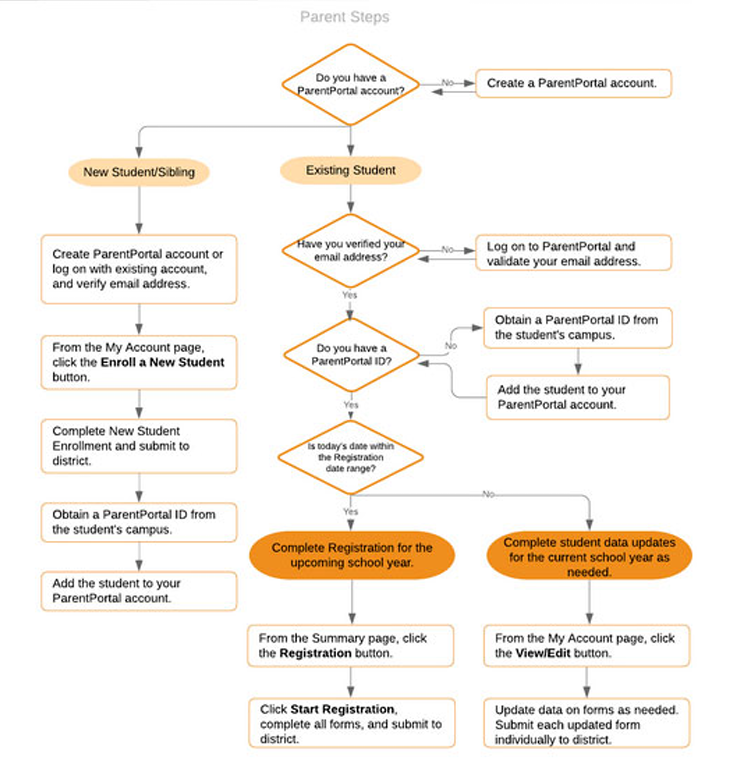
NEW STUDENTS: Create a parent portal account by clicking on Create Account. After creating an account and logging in, click on Enroll a New Student to begin. Fill out the contact information and complete all forms.
Upload the following documents.
- Student's Birth Certificate
- Social Security Card
- Immunization Records
- Your Driver's License
- Proof of Residence ie: utility bill, rental agreement. – Must have your name and the physical address of your residence
Once this step is completed you will receive a confirmation page and the campus will assign a portal ID. Log back into parent portal to link you student and finish the registration process.
RETURNING STUDENTS:
Login into parent portal with you establish credentials and click the registration button to begin the process
ALL FORMS ARE NOW ELECTRONIC AND IN PARENT PORTAL
Click the link below to create an account and begin the process:
https://portals06.ascendertx.
Click here to view a new enrollment guide with detailed instructions
Contact information
PK-6th Grade - Taylor Ellison tellison@onalaskaisd.net ; 936-646-1034
7-12th Grade - Wanda Ebert webert@onalaskaisd.net ; 936-646-1041